How to rank in ChatGPT
 Eli McGarvie · · 15 min read
 Getting your brand mentioned by ChatGPT is becoming more and more valuable as AI adoption increases. We are seeing brands getting discovered and closing deals thanks to AI recommendations. If you are a digital brand, there are a number of ways you can get your brand recommended by an AI tool like ChatGPT.
In this guide, I’ll walk you through the different ChatGPT SEO strategies you can use to rank in ChatGPT and increase your visibility. First, you need to find out where your brand should be popping up. Then I’ll explain how these tools recommend and what influences those decisions, and finally, how to measure and track AI visibility.
Step #1: Research
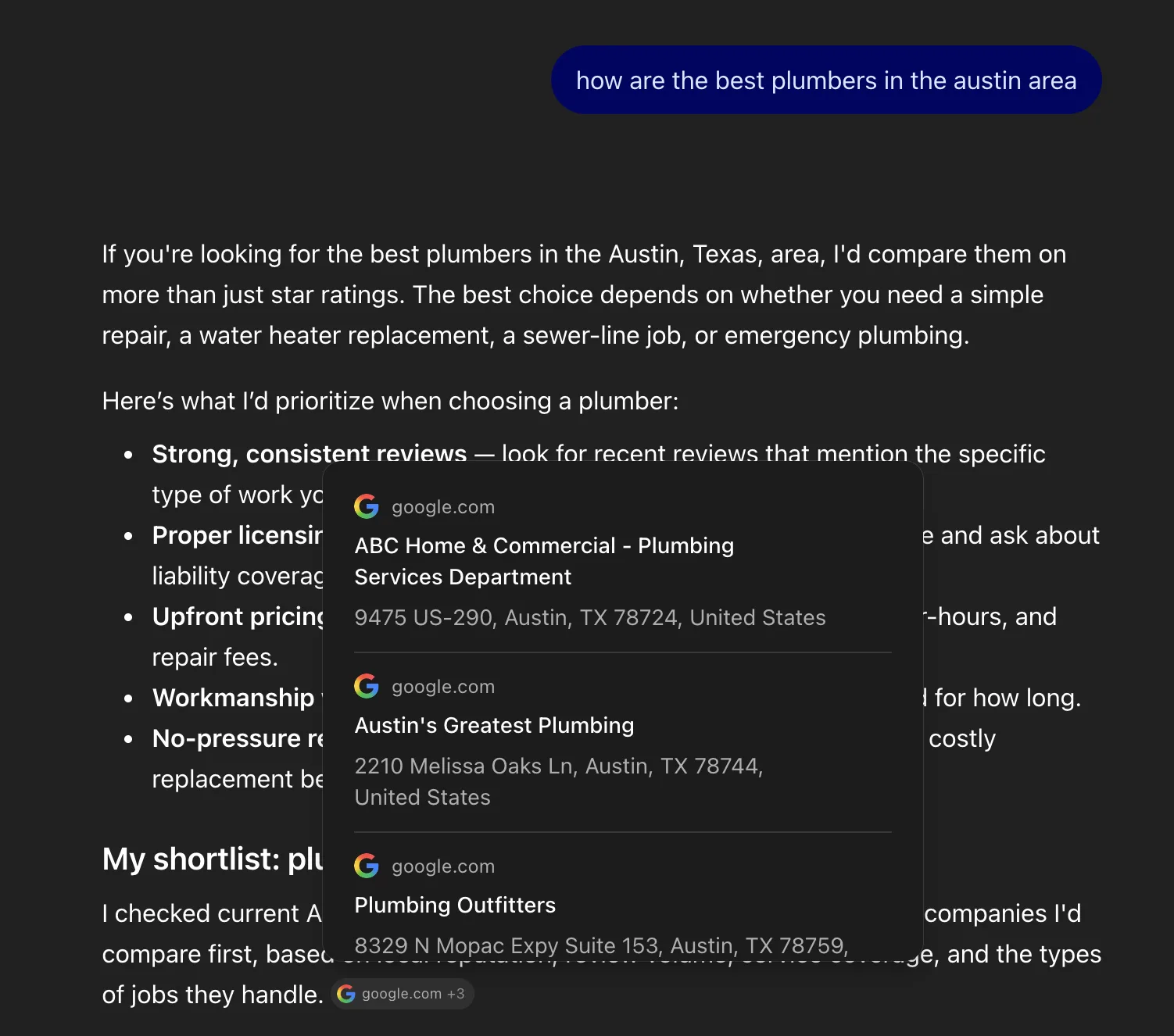
The first step to getting mentions on ChatGPT is to create a baseline and collect the search data; that way, you can plan what to aim for. If you are familiar with Google keywords, it’s a very similar process. We want to know how people are searching to discover brands like yours, who they are being referred to, and why they are being referred to those businesses and not yours.
You should approach this from two angles.
The first angle is to compile a list of the main search queries and record the answers that ChatGPT generates. For example, a customer asks Chat, What’s the best product for X? or I live in [city], give me a list of businesses that solve [problem] for me. Many people use ChatGPT just like they would Google, with short phrases without much context, to quickly see a list and make a buying decision. These will be the most important mentions for your brand.
Compile all of those queries in a list.
The second angle is to think about the buyer’s interests and the problems they might discuss before realising a solution exists. A user’s journey can take various routes, so try to consider them all. And remember, at all those different points, you want to be the site that has the answer. These conversations are usually longer, with more back and forth.
With a conversation like that, there are multiple points at which a brand can show up if they want. They could write a piece about why someone might get grey hair. They might also write a page that explains all the underlying causes. And they can also write a page that lists the best supplements and treatments for this issue.
Again, log all of this in a list.
Now we want to see what answers ChatGPT is generating, if your brand shows up at all, and which other competitors are getting preferential treatment.
There are a couple of ways to go about this. You can go the free way, which is more time-consuming but costs nothing: open ChatGPT, manually ask it each question or query, and record the answer and the sources it uses.
I use DataForSEO, which for something like this only costs a couple of dollars. It allows me to run dozens of queries at once across multiple AI tools, including ChatGPT, Claude, and Perplexity. I can do all this without opening ChatGPT. It’s a lot easier to get a comprehensive overview across all AI engines.
I would also encourage you to think of situations or problems your competition hasn’t addressed at all, meaning there’s an informational gap in the market that you could easily fill. It’s not always easy to find, but if you do, you’ll be the only source mentioned, and getting there is a lot easier.
At this point, you should have a full list of all the different conversations in ChatGPT, a log of the answers, and a list of sources for each. You should also have a basic understanding of your brand’s visibility, i.e. yourbrand was mentioned 10 times vs yourcompetitor 100 times.
Step #2: Getting set up for AI visibility
We’ve done the research; we know where we should be visible and where we are visible. Before we start implementing strategies, let’s make sure your site is optimised for AI search and positioned well. In many cases, just setting up your site correctly and fixing a few of the gaps can drastically boost your mentions, so it’s always smart to cover those bases before running a time-consuming content or PR campaign.
Start with these:
1. Bing – thanks to ChatGPT, Bing is making a comeback. Microsoft and OpenAI are partners, and as a result, ChatGPT is deeply integrated with Bing. That makes Bing an incredibly important tool for AI visibility. And honestly, you don’t have to do much: just set up your site on Bing Webmaster Tools if you haven’t already, submit your sitemap, set up IndexNow, and you’re good to go. Simply having your site indexed on Bing will bring you AI mentions.
2. Schema markup – you most likely have schema markup on your web pages already, but it’s worth double-checking to see if it’s up to date and complete. I’ve reviewed a ton of sites that have schema, but it’s not doing the job it’s designed for. They might have products on their pages but no product schema. Schema feeds rich results and is the code that AI engines read on your pages – the code is written in a language that’s super easy for them to process and should tell them all they need to know about the page.
3. llms.txt – lots of people say adding an llms.txt file to your site makes no difference. Google has gone back and forth on it. My opinion: it takes 5 minutes to do, so just do it anyway. At worst, nothing changes; at best, it boosts visibility.
4. Web pages – if you don’t have a healthy site with high-quality pages, fixing and improving your pages should be your number one priority. AI is not going to recommend you if your website has limited info and offers a terrible user experience. Put your business information on your pages. List your prices, and create separate pages for each service or product. Answer customer questions, outline company policies (refunds, payment, step-by-step, privacy, etc.), and publish documentation on how to use your product or tool; the more info, the better. More on this later.
Local
With a local business, there are a few more considerations. People mostly find you through Google Maps and other local searches. ChatGPT cites Yelp, Tripadvisor and Google depending on the query, though Google tends to dominate. I would advise you to cover all your bases while you are here, to account for the other AI search tools and maximise your visibility across everything.
5. Google Business Profile – Google Maps is the industry leader, so you should always be optimising your profile. Claude uses Google Maps, and it will be a touch point for ChatGPT, which has its own custom map interface. I could write a whole article on Google Business Profile optimisation, but just quickly: make sure your keywords are present in the description, add your services with keyword-rich descriptions and links to the service pages, make sure all the details are filled in and aligned with all the other map tools, add a booking button, collect reviews, add directions, and so on. The more info on your map pack and the more reviews you collect, the easier it is for ChatGPT to understand your profile and recommend it.
6. Apple Maps / Bing Maps – Apple and Bing Maps have a few quirks but are very similar to Google Maps. Apple doesn’t allow you to post all your services with links, but instead lets you highlight a few offers, which you can use to display your services or promotions. Again, the most important thing here is to just fill in all the info and make use of all the features. Apple Maps pulls data, photos, and reviews directly from Yelp, so that’ll be the second half of the job.
7. Yelp / Tripadvisor – while many people may not be using Yelp or Tripadvisor these days, they are partnered with ChatGPT and Apple Maps, so that’s a good enough reason to create a profile (if you don’t have one) and make sure it’s complete.
Step #3: Strategies to get mentioned in ChatGPT
In step one, I explained how to collect research. You’re going to need that spreadsheet for this step, so pull it out and follow along.
Fix your current web pages
First, I want you to compare your current web pages to the list of queries. Are there any pages that already exist that ideally should be getting mentions for some of those questions? For example, you have a category page that lists properties for sale in a specific area, but when someone asks Chat for a real estate site that lists properties in that area, you don’t show up. Or maybe you have a blog that details the best brands for plus-size women, but when Chat is asked, there’s no mention of your blog.
For the most part, you should be able to match up a good portion of the queries with pages that you already have on your site. There will be a ton of crossover, and the same page can appear for different queries. So before you go creating new pages, go back and optimise and update the existing ones. More pages ≠ better. Strong core pages are the best.
Go take a long, hard look at those pages and figure out why they are not doing well. Usually, it’s an obvious reason, like the on-page SEO is not good, the page is thin, or your content is poorly written. Read this article we wrote; it explains the best way to create and update pages.
Listicles, comparisons and alternatives
Once you are sure that your core pages and blogs are up to scratch, then you can start thinking about new content pieces that will increase AI visibility.
This year, we’ve seen listicles and comparison articles dominate AI search. These article types are formatted in an ideal way for AI engines. ChatGPT loves structured content, content that it can easily summarise, and articles that have all the research ready to go.
For listicles, I generally start with the most top-level, highly searched content. Start broad, then work your way down.
You mention your brand or product at the top of the list, give an honest review, be specific, and call out the unique aspects of each brand. The more research, the better the piece.
I would start with maybe 10, make sure the topics you are writing about are very closely tied to your brand or product, and then wait and measure the results. There’s no point going all in without first understanding the response.
Comparison pieces are straightforward. Take a list of your competitors. Start with the top players that have brand recognition. There are a few formats you can use: you can compare competitors and then pitch your own as an alternative solution to both, or you can write comparisons of your brand against a competitor. Then just work your way down the list. A handful of these pieces should be enough, but make sure they are detailed and really dig into the various features and differences. The more data, the better.
People search for products based on what they already know: Supabase alternative, Mailchimp alternative. They know a product exists, but they are looking for something that better fits their requirements. Like with the comparison articles, take your top competitors or recognised brands in the space and write some alternative articles. These will also act like a comparison, but usually with a few more brands listed. So you might list 5-10 alternative options with your brand mentioned at the top.
And that’s basically it. I’d start with a few of each, all well researched and written, then measure the results. If there’s improvement, lean into it; if not, maybe think about another strategy.
Brand mentions
ChatGPT takes multiple sources into consideration before recommending a brand or service. It likes to see that reputable third-party sources are mentioning your brand. Media, niche sites, social media, industry experts — these are all touch points for ChatGPT.
Your brand’s exposure online correlates with your brand’s AI visibility. So, returning to the research we did in step one: you should have recorded all the sources ChatGPT was citing in its answers. Take a look at all the third-party pages that were cited. These will be listicles, comparisons, guides, and reviews from industry and affiliate sites.
Now reach out to these sites and ask to be mentioned in their article alongside your competitors. Some will ask for payment, and that’s fine. A backlink isn’t always necessary; just having your brand mentioned is enough for ChatGPT. If you manage to get mentioned on the web pages that ChatGPT is citing, then it won’t be long before ChatGPT is citing your brand directly in chat.
Social media
ChatGPT also cites Reddit, LinkedIn (another Microsoft product), and YouTube. These are all great places to gain visibility. Go easy on Reddit; don’t spam your brand there, since they are cracking down on brands that have been taking advantage of this hack.
LinkedIn articles rank really well on Google and, if they are keyword optimised, can show up in AI conversations. This is basically the same format as a blog you’d post on your own website, no real difference here.
YouTube has been very good lately. Now that AI can access video transcripts, brands with YouTube channels have a lot more reach, both through AI and organically. Google has also integrated YouTube into search results, within the top results and with new video display sections.
Step #4: Monitor your AI visibility
We’ve discussed how to research, optimise, and show up in ChatGPT; now you’ll need to measure the results.
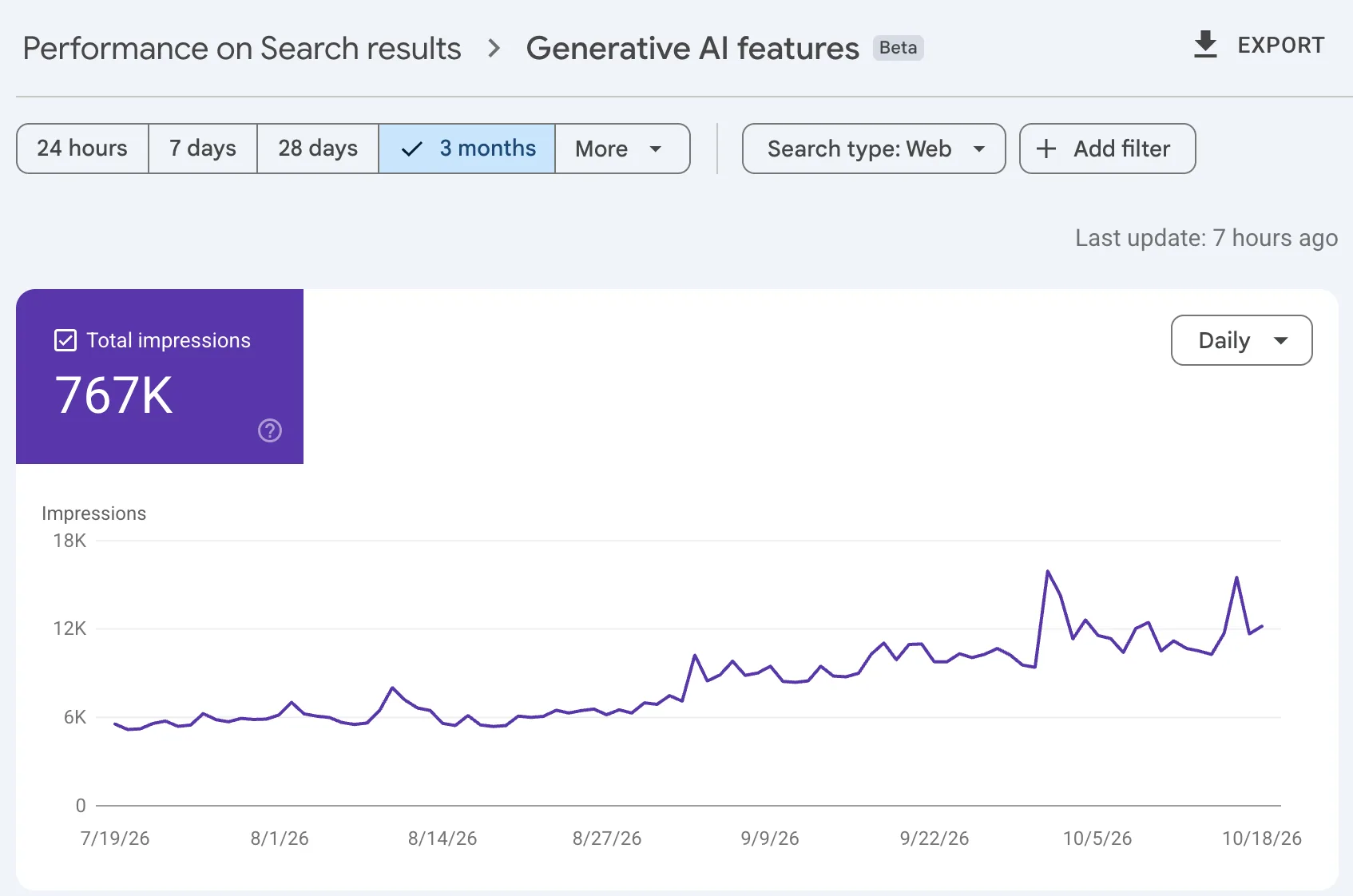
Since this is a new space, it’s taken some time for the tracking tools to catch up and incorporate ways to measure traffic and mentions. Regardless, new features have been added to Google Analytics, Google Search Console, and Bing.
You’ll see tabs in these tools that track AI. Google Search Console shows impressions. Google Analytics filters AI assistant traffic, and Bing, surprisingly, has the most comprehensive dashboard, showing citations, cited pages, and queries, and it offers topic suggestions to help you grow.
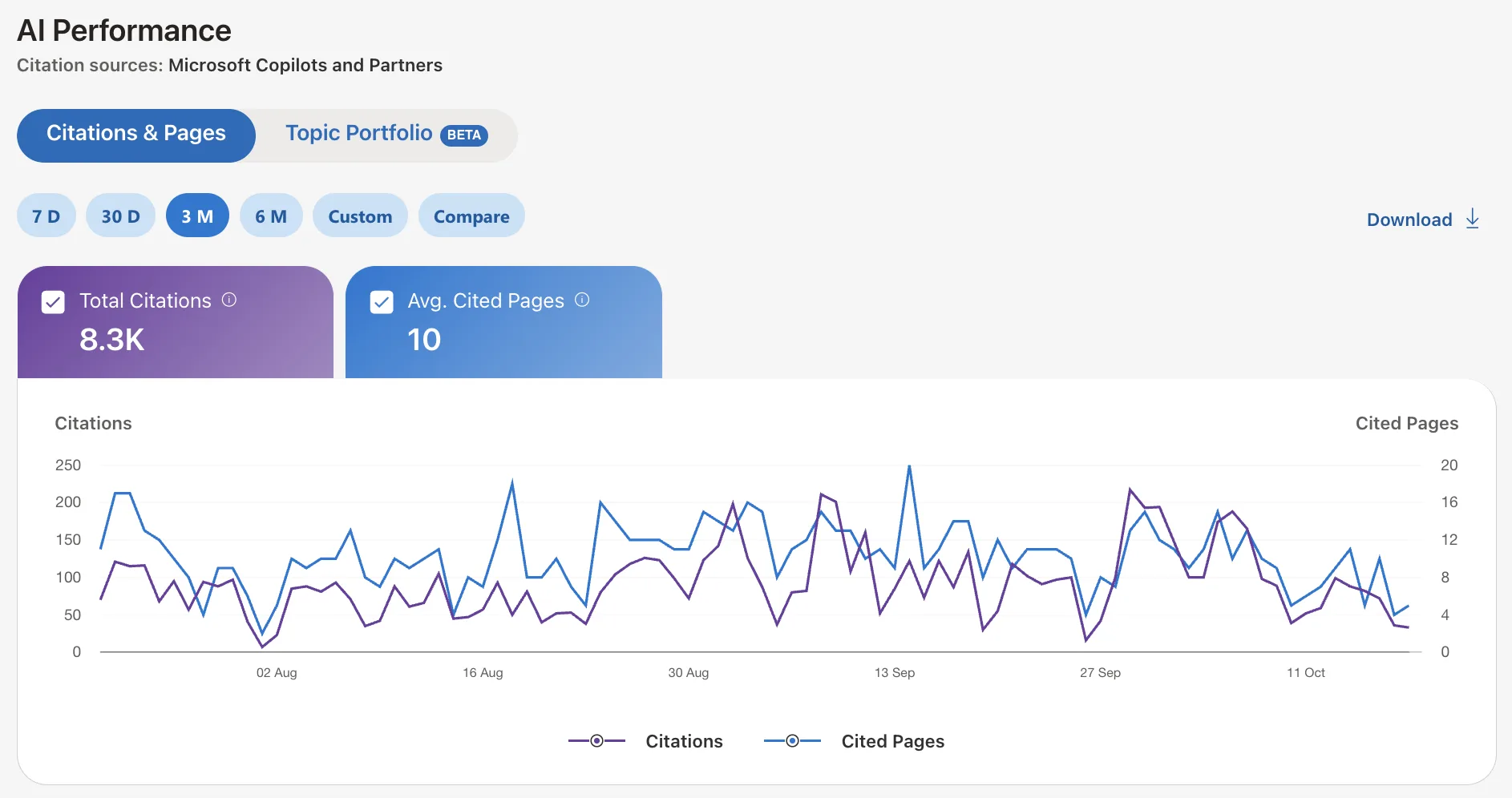
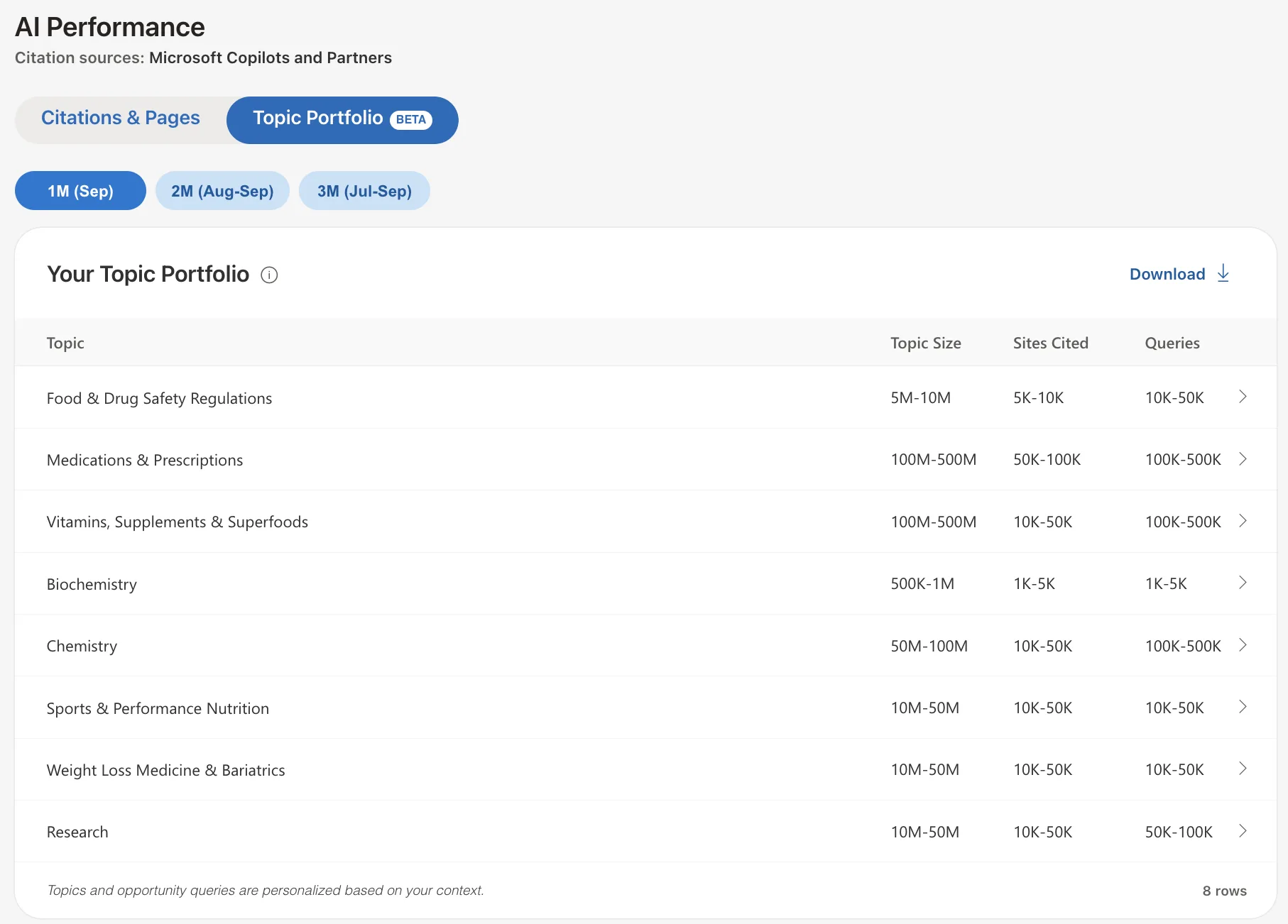
Microsoft’s Clarity recently added AI tracking, and it has quickly become an expert favourite, since it features dashboards monitoring user behaviour, tracks AI mentions and citations, and integrates with Google Analytics for an audience overview. While it’s nice to use, it doesn’t really offer more on the AI side of things than Bing already has.
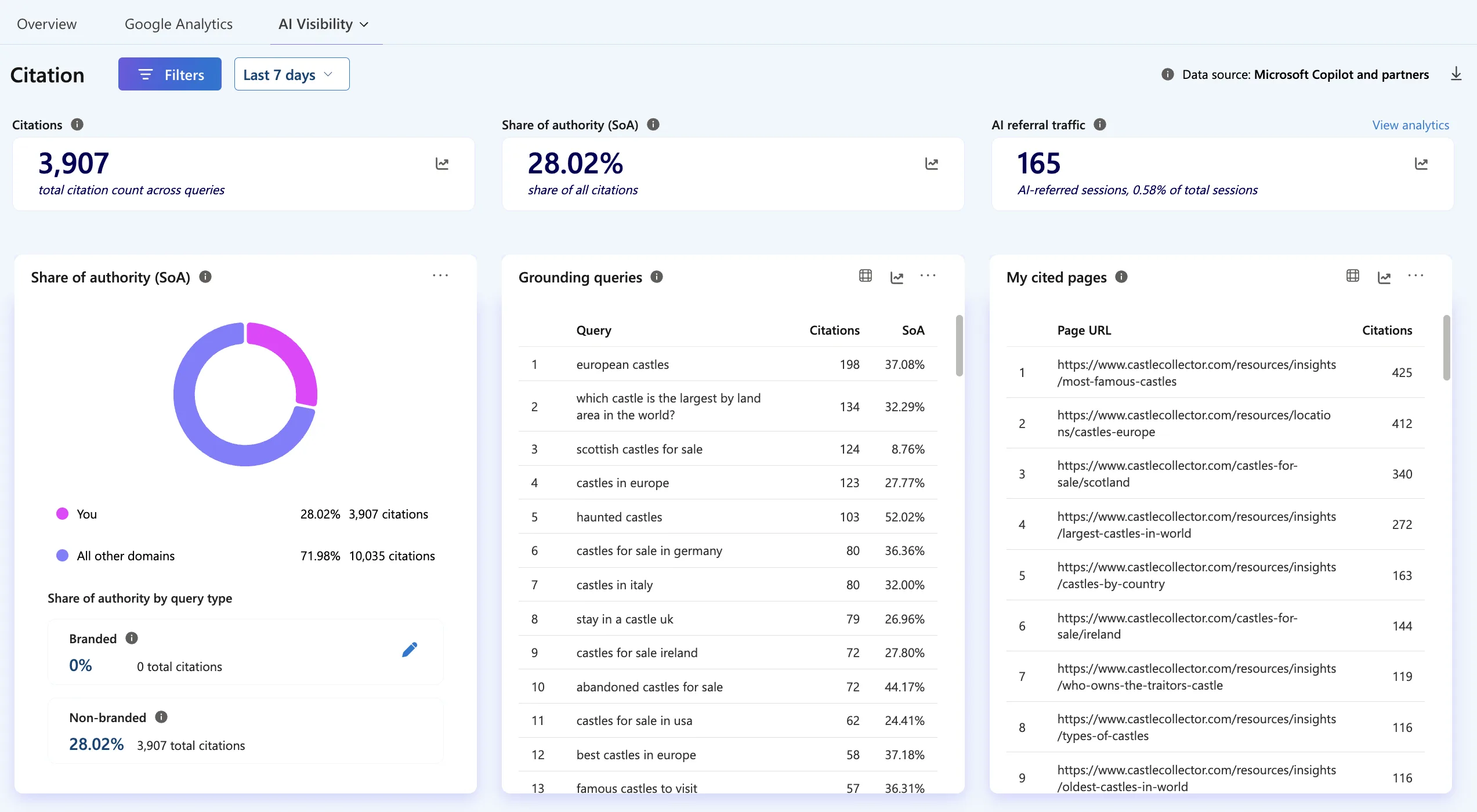
These are all free tools that you should make use of, but for the most part, they only provide directional insights. If you’d like to dive deeper and really measure your growth, consider a paid tool.
Tools like Ahrefs and Semrush have features that track brand mentions and AI citations across all the major AI engines. The downside is that they are quite expensive, which is why I hesitate to recommend them to a smaller business.
DataForSEO, the tool we used for research at the start, is probably the cheapest option. You can baseline the results of all the queries, then a month later run that same test and track movement. This will only cost you a couple of dollars each time, depending on the number of queries you are tracking.

A tool I would recommend, and that I use as a professional SEO, is Genezio. This is an all-inclusive tool where you can literally execute all the steps above within one tool. You can research, find the gaps, write content and track AI visibility, all from one app. I’d recommend this to someone who doesn’t have the time to handle AI search but knows it’s important and doesn’t want to get left behind.
See Genezio →